Free website security check · no account needed
Find out what your website's security setup gets wrong, and what to fix first
Prime Dev Force Security checks a domain from the outside: HTTPS and redirects, TLS certificates, security headers, DNS, and email authentication. Every finding shows the exact evidence we observed, and the results become a prioritized fix list with step-by-step instructions.
- 27checks
- 6areas
- 3–15 sper check
- 0reports stored
- Evidence for every findingEach result shows the exact header, DNS record, certificate or redirect we observed.
- A score you can recomputeThe scoring model is published, with fixed deductions per severity.
- Honest about coverageChecks that couldn't run say so, and every report lists what wasn't checked.
- Reports aren't keptWe don't store free-check reports or the domains you check. Recent scans stay in your browser. See the privacy notice.
What the free website security check covers
Twenty-seven checks in six areas, run in one pass. Each area links to an explanation of exactly what is checked and why it matters.
-
HTTPS and redirects
Whether the site answers over HTTPS, whether plain HTTP redirects to it, and whether any redirect downgrades to HTTP or loops. Also HSTS.
Visitors' connections can't be quietly downgraded.
-
TLS certificates
Certificate expiry, whether it covers your hostname, whether the intermediate certificate is sent, and whether TLS 1.0 and 1.1 are still accepted.
Catch an expiring or misconfigured certificate before visitors see a warning.
-
Security headers
Content Security Policy, clickjacking protection, MIME-sniffing protection, Referrer-Policy, Permissions-Policy, cookie flags and version disclosure.
See which browser protections your pages switch on, and which they don't.
-
Email authentication
MX, SPF (including the 10-lookup limit), DMARC, DKIM for a selector you supply, MTA-STS and TLS reporting.
Make it harder for others to send mail that looks like it's from you.
-
DNS
Address records, DNSSEC validation through a validating resolver, and CAA records that limit which certificate authorities may issue for you.
Know whether your DNS answers can be verified.
-
Homepage content
Scripts, styles and images loaded over insecure http://, and a publicly announced CMS version, in the first 512 KiB of the homepage.
Find mixed content that browsers block or warn about.
What you get back
A report built to act on, not just to read:
- A Site Health score from a published, deterministic model, withheld when too little could be checked to score honestly.
- Prioritized tasks from P1 (do first) to P4 (optional), each with the business impact, step-by-step fixes and references.
- The evidence behind every finding: the header, record, certificate or redirect chain as observed.
- Every check's status: passed, issue found, could not complete, not tested or not observable. A check that couldn't run is never shown as passed.
- What wasn't checked, listed in every report, plus a JSON download and a printable version.
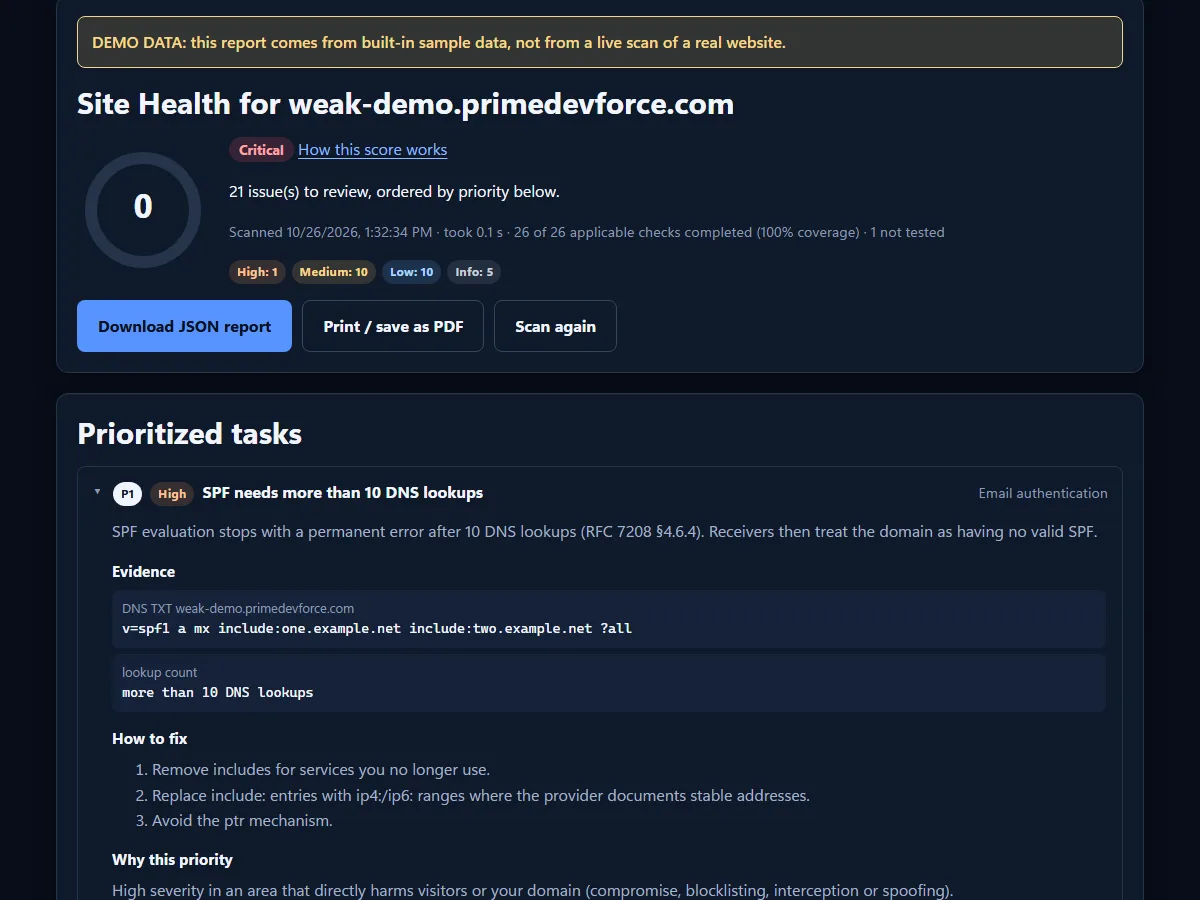
weak-demo.primedevforce.com, a test domain with deliberately weak settings. Not a real website's results.How the check works
Enter a domain you own
Type the domain or a URL. Private and reserved addresses are refused, and nothing is sent to the site except ordinary requests.
We look from the outside
The homepage over HTTPS and HTTP, a short TLS handshake for the certificate, and public DNS and email records, from Cloudflare's network. See what the scanner requests.
Read the findings
Each finding explains what was seen, why it matters and how serious it is, with the raw evidence alongside.
Fix in priority order
Work through the tasks from the top, then run the check again to confirm the fix. The report tells you which findings it can verify.
For sites you own: monitoring and a server agent
The free monitoring beta covers one domain you've proved you own (by DNS record or a file on the site). It is periodic monitoring, not real-time protection.
Scheduled checks and alerts
The full check runs on a schedule with 90 days of history. Changes such as new findings or a score drop can be sent to Slack, Discord or any webhook.
Weekly subdomain and page checks
Up to 10 subdomains and 5 sign-in, checkout or contact pages, checked weekly, with an exact line saying what was covered and what was skipped.
Malware indicators
Homepage checks for injected scripts, skimmer patterns, hidden links and content shown only to search engines. These are indicators to confirm, not proof.
Server agent
Runs on your server (WordPress plugin or PHP command line) and compares core files with official copies for WordPress, Joomla and Drupal. On WordPress it also reads the database, read-only.
Cleanup you approve
Quarantine a file, restore an official copy or remove an injected fragment from a post. Nothing changes without your approval, everything is backed up first, and every change can be undone.
Known vulnerabilities
Installed versions reported by the agent are matched against public vulnerability data: Wordfence Intelligence for WordPress, OSV.dev and the NVD for Drupal and Joomla.
What this check can and can't tell you
What it checks
Publicly observable configuration: what your web server, certificate, DNS and mail records show to anyone who looks. The full list, with what each result can establish, is on What we check.
What it doesn't check
The free check doesn't log in, doesn't read your server's files or database, sends no attack payloads, and can't detect malware. It is not a penetration test or a PCI scan. A clean result means none of these checks found a problem, not that the site is secure.
Results are a point in time
Each report shows what was observed when it ran. Settings change, and some sites answer differently to different visitors or locations. Run it again after a change, or use monitoring for scheduled checks.
What happens to what you enter
The domain you enter is used to run the check, and reports are returned to your browser without being stored on our servers. To check certificates, the domain is also looked up in public Certificate Transparency logs (crt.sh). Details are in the privacy notice.
What to do when something is found
Start with the P1 tasks. Each one has fix steps written for the most common setups and links to the relevant standard. Make one change at a time, then run the check again to confirm it. If a finding points to a possible compromise, follow the incident steps in that finding before deleting anything.
Frequently asked questions
What does Prime Dev Force Security do?
It checks a website's public security configuration (HTTPS, certificates, security headers, DNS and email authentication) and turns the results into a prioritized fix list with evidence. For domains you verify, it also offers scheduled monitoring, malware indicators and a server agent for file and database checks.
Is the website security check really free?
Yes. The one-off check needs no account. Monitoring is also free for one verified domain. Pro (5 domains, 1 year of history) and Agency (30 client domains, branded client reports) are paid; see Plans and pricing.
Which checks run, and how long does it take?
Twenty-seven checks across HTTPS and redirects, TLS certificates, security headers, DNS, email authentication and homepage content. Most checks finish in 3 to 15 seconds. The complete list is on What we check.
Does a good score mean my website is secure?
No. It means none of our checks found a problem in what can be observed from outside. The check can't see your server's files, plugins, database or admin area, and it can't detect malware. The scoring page explains exactly what the number means.
How do I read "could not complete" or "not tested"?
"Could not complete" means the check tried to run but couldn't, for example because a server timed out or the certificate couldn't be read. "Not tested" means it was skipped, for example DKIM without a selector. Neither counts as a pass, and both lower the coverage figure instead of the score.
Can I check a website I don't own?
Only check domains you own or have permission to check. The free check uses only public information and ordinary requests. Monitoring, malware indicators and the weekly subdomain and page checks are limited to domains whose ownership has been verified.
Why can't the certificate of my Cloudflare-hosted site be read?
Our scanner runs on Cloudflare Workers, which can't open direct connections to Cloudflare's own network. For sites behind Cloudflare, the certificate checks report "could not complete" and show the most recently logged certificate from Certificate Transparency instead, clearly labelled. See the certificate check for details.
Check a domain you own
Free, no account, results in seconds, with the evidence behind every finding.